


My portfolio was built with Next.js 14. It worked fine. Looked good. Had all the features I needed. So naturally, I spent two weeks rebuilding it from scratch in Astro.
Was it necessary? Absolutely not. Do I regret it? Not even a little.
The Next.js Portfolio Was… Fine
Let me be clear, Next.js is great. I use it at work. I recommend it to people. My portfolio had:
- App Router (because I like living on the edge)
- MDX for blog posts
- Server Components where it made sense
- Client Components for interactive bits
- Vercel deployment (obviously)
Performance was good. Lighthouse scores were green. Everything worked.
But here’s the thing, I was shipping way more JavaScript than I needed.
The Moment I Questioned Everything
I was looking at my portfolio’s bundle size. The homepage, literally just text, some links, and a photo, was shipping 85KB of JavaScript. For what? To render static content that never changes?
I started thinking: “What if I could ship almost zero JavaScript?”
That’s when I remembered Astro existed.
What Actually Sold Me on Astro
1. Islands Architecture (The Main Reason)
This is the killer feature. Most of my portfolio is static. Blog posts? Static. Projects list? Static. About page? You guessed it, static.
But I have a few interactive bits:
- Dark mode toggle
- Mobile menu
- Contact form
- Maybe some animations
With Next.js, even with Server Components, I was hydrating the entire page. With Astro, I can do this:
---
// This runs at build time, server-side only
const posts = await getCollection('blog');
---

<Layout>
  <h1>My Blog</h1>

  <!-- Static HTML, zero JS -->
  <PostList posts={posts} />

  <!-- Only this gets JS -->
  <SearchBar client:load />
</Layout>
The SearchBar gets JavaScript. Everything else? Pure HTML. Chef’s kiss.
2. Content Collections (The Second Reason)
Astro’s content collections are so good. Type-safe frontmatter out of the box:
// content.config.ts
const blog = defineCollection({
  schema: z.object({
    title: z.string(),
    publishedAt: z.string(),
    summary: z.string(),
    tags: z.array(z.string()).optional(),
  }),
});
Now TypeScript knows exactly what’s in my blog posts. No more “did I spell publishedAt or publishDate?” moments.
3. It’s Just Faster
My homepage went from 85KB of JS to… 3KB. And that’s just for the dark mode toggle.
First Contentful Paint dropped from ~1.2s to ~0.4s. Time to Interactive is basically instant because there’s nothing to hydrate.
Users on slow connections actually notice the difference. I tested on my phone with throttled 3G, night and day.
The Migration Wasn’t Bad
I thought it would take a week. Took me about two days of actual work (spread over two weeks because, you know, life).
What was easy:
- Moving MDX files (literally just copy-paste)
- Styling (I use Tailwind, works the same)
- Static pages (actually simpler in Astro)
- Deployment (Vercel supports Astro perfectly)
What was annoying:
- Rethinking which components need JavaScript
- Learning Astro’s component syntax (similar to JSX but different enough to trip you up)
- Figuring out view transitions (ended up being worth it though)
What I had to change:
- My React components that didn’t actually need React
- Some routing logic (Astro’s file-based routing is simpler but different)
- How I handle dynamic OG images (still using Vercel’s OG, just different setup)
Things I Miss About Next.js
Let’s be real, it’s not all perfect:
1. The React Ecosystem
Sometimes I want to use a React library and I have to think “wait, does this need client-side JS?” With Next.js, I just installed it and moved on.
2. Image Optimization
Next.js’s <Image> component is slightly better than Astro’s. Not a dealbreaker, but noticeable.
3. Middleware
Next.js middleware is powerful. Astro’s is… simpler. Which is fine for a portfolio, but I’d miss it for a real app.
Things I Love About Astro
1. View Transitions
Astro’s view transitions are stupidly easy:
---
import { ViewTransitions } from 'astro:transitions';
---

<head>
  <ViewTransitions />
</head>
Boom. Smooth page transitions. No library needed.
2. Markdown/MDX Support
It just works. No weird config. No plugins breaking between versions. It’s built-in and it’s great.
3. The Mental Model
“Ship HTML by default, add JavaScript only where needed” is so much simpler than “everything is JavaScript, optimize later.”
I’m not fighting the framework. I’m just building.
Performance Numbers (Because Data is Cool)
Before (Next.js):
- Homepage: 85KB JS, 1.2s FCP
- Blog post: 92KB JS, 1.4s FCP
- Lighthouse: 95/100
After (Astro):
- Homepage: 3KB JS, 0.4s FCP
- Blog post: 8KB JS, 0.5s FCP
- Lighthouse: 100/100
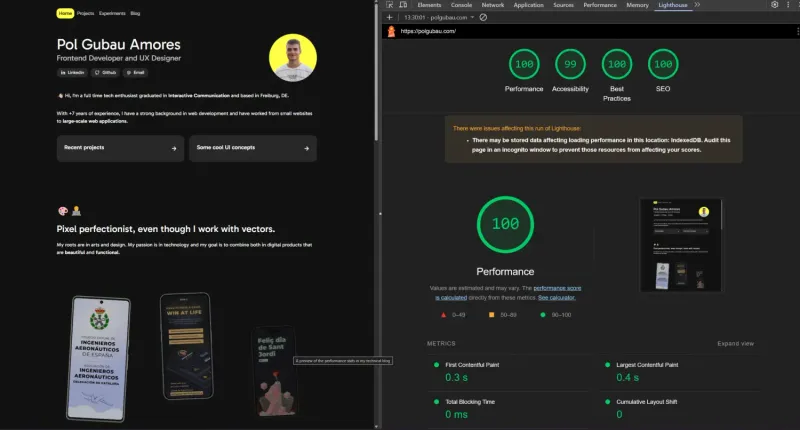
Is this a fair comparison? Not really, I also optimized images and removed some stuff. But the JS reduction is real.
Should You Rebuild Your Portfolio in Astro?
Honestly? Probably not.
If your Next.js (or whatever) portfolio works fine, don’t fix it. Spend that time writing blog posts or building projects.
But if you’re:
- Building a new portfolio from scratch
- Frustrated with bundle sizes
- Mostly shipping static content
- Curious about new tech
Then yeah, try Astro. It’s fun. It’s fast. And it might just click for you like it did for me.
The Real Reason I Did This
Let’s be honest, I didn’t need to rebuild my portfolio. But I wanted to understand Astro deeply. Reading docs is one thing. Migrating a real project is another.
Now when someone asks “should I use Astro or Next.js?” I can give an informed answer. That’s worth two weeks of my time.
Plus, my portfolio loads stupid fast now, and that makes me unreasonably happy.
If you want to see the code, it’s all on GitHub. Feel free to steal whatever you want.
And if this performance obsession sounds familiar, it’s the same mindset I applied to Pol-UI - a component library built to be fast and accessible without trade-offs, or to Les Santes - a festival app that works offline at venues with no signal.
Related Articles
React 19 New Features: Actions, use Hook, and Migration Guide
Complete React 19 guide covering new features: Actions API, use hook, document metadata, ref as prop, and more. Includes migration tips, breaking changes, and real-world examples from production apps.
React Component Composition Patterns: Compound Components, Render Props & More
Master React component composition patterns with real-world examples. Learn compound components, render props, slots, and context patterns. Reduce props, increase flexibility, and build better design systems.
Modern CSS Features 2026: Container Queries, :has(), Cascade Layers & More
Complete guide to modern CSS features in 2026. Learn container queries, :has() selector, cascade layers, subgrid, OKLCH colors, and view transitions. Practical examples with browser support info.